The message below is fake. We wrote it for this article, but it copies the pattern that security agencies and Booking.com itself have described through 2026. Read it the way you’d read it on your phone: tired, between trains, a few days before check-in. Would you click?
[Your hotel’s name] (via WhatsApp) Dear Alex Morgan, thank you for your reservation 4417-882-391 for 14–17 March. Unfortunately our bank could not verify your card and your booking will be cancelled automatically in 12 hours. To keep your room, please confirm your payment details here: booking-verify.example/4417882391. After confirmation, a refund of the duplicate charge will be sent within 24 hours. Best regards, Reception.
It’s convincing because the parts you’d normally check are real: your name, your booking number, your dates. That’s the point of the scam. Now let’s take it apart.
Line by line: where it gives itself away
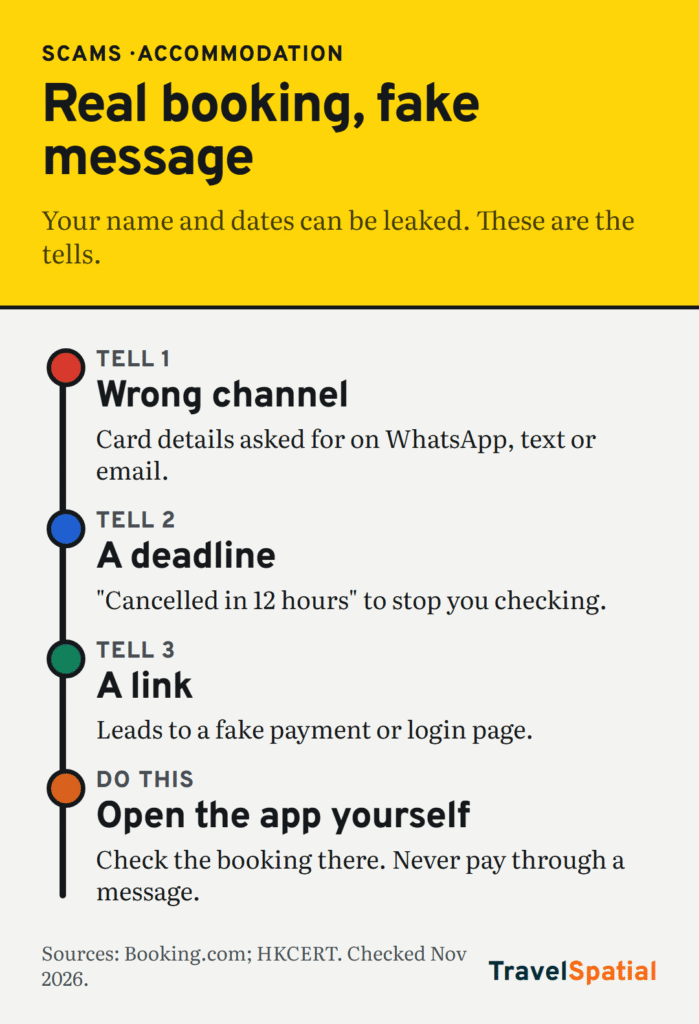
“[Your hotel’s name] (via WhatsApp)” The first red flag is the channel. Booking.com says it will never ask you to share card details “by email, over the phone, through text or WhatsApp” (Booking.com trust and safety, checked November 2026). A real property might message you on WhatsApp about directions or check-in times. A request for payment details there is the scam’s tell.
“Dear Alex Morgan… reservation 4417-882-391 for 14–17 March” This is the part that fools people, and it isn’t proof of anything. Hong Kong’s computer emergency response team, HKCERT, warned in June 2026 that fraudsters were using what appears to be genuine booking information previously leaked from Booking.com, including real check-in dates and full guest names (HKCERT, checked November 2026). HKCERT adds that the leaked data may include names, emails, phone numbers and messages between guests and properties. Booking.com’s own page also warns that phishing messages “include convincing details about the dates and cost of your stay.”
“our bank could not verify your card” A payment problem you haven’t seen anywhere else. If there really were one, it would show in your booking in the app or on the website. Check there, not in the message.
“will be cancelled automatically in 12 hours” Urgency. Booking.com’s description of phishing names it directly: “urgent requests to (re)share payment information in order to retain your booking.” A deadline is there to stop you checking.
“confirm your payment details here: booking-verify.example” The link is the trap. It isn’t on booking.com, and it leads to a page built to collect your card number, login or one-time passcode. HKCERT describes exactly this: fake login, payment or verification pages. Never pay or log in through a link in a message. Open the app yourself.
“a refund of the duplicate charge” A second hook. It turns a payment request into something that sounds like it’s in your favour, and it explains why you might be asked for a code from your bank.
“Best regards, Reception.” No name, no direct phone number you could check against the property’s own website. Small, but it fits the rest.
The five-second test
Before you act on any message about a booking, ask three questions:
- Is it asking for card details, a code or a bank transfer? If so, it’s almost certainly a scam. Booking.com also says it will never ask you to make a bank transfer that differs from the payment policy in your confirmation.
- Does the same request appear in the official app or website? Open the app yourself. Don’t use the link.
- Can the property confirm it by phone? Use the number on the property’s own website or in your confirmation, not the one in the message.
If you’re still unsure, Booking.com’s advice is to contact its customer service before you do anything.
Airbnb’s version of the trap
Airbnb scams are often different: an offer to book or pay outside the platform. Airbnb’s rules say it’s against policy for hosts to ask you to take your booking off Airbnb, or to message outside the platform before you book. If you pay outside Airbnb, you lose AirCover, its built-in protection for refunds and support (Airbnb Help, checked November 2026).
So treat these as red flags on any platform:
- “Pay by bank transfer and I’ll give you a discount.”
- “Let’s continue on WhatsApp, the app is slow.”
- A listing far cheaper than every similar place nearby, with a host who’s keen to move the conversation.
If you’re choosing between platforms for a long stay, our coliving vs Airbnb monthly comparison explains how each handles payment and deposits. For hostels, our Hostelworld vs Booking.com guide covers when you pay and to whom.
If you’ve already clicked, entered details or paid
Move fast, in this order.
- Call your bank or card provider. Tell them you’ve been scammed, freeze or cancel the card, and ask about disputing the payment. If that leaves you without a working card abroad, follow our emergency money plan for a lost card until the replacement arrives.
- Change your password on the booking platform, and on any other account that uses the same password.
- Report it to the platform through the app or website, so it can warn the property and check your booking is still valid.
- Check your booking is still active. Scammers rarely cancel it, but confirm before you travel. If it is cancelled, you’ll want a new place quickly. Our neighbourhood guide helps you pick a safe area in ten minutes.
- Report the scam. In the UK, forward suspicious emails to report@phishing.gov.uk, as the National Cyber Security Centre asks (NCSC, checked November 2026). Elsewhere, use your country’s fraud reporting service.
Lock it down before your next booking
- Turn on two-step verification for your booking accounts.
- Use a credit card rather than a debit card for bookings, if you have one. It’s usually easier to dispute.
- Keep conversations and payments inside the platform, even when a host or property suggests otherwise.
- Expect messages that quote your real booking. A correct name and date don’t show a message is real.
Scams change shape every year. Our newsletter keeps track, so you don’t have to.
Sources
- Booking.com, Trust and safety for travellers (never asks for card details by email, phone, text or WhatsApp; never asks for a bank transfer outside the payment policy; phishing includes real dates and cost and urgent payment requests; contact customer service; checked November 2026)
- HKCERT, Phishing alert: Booking.com messages exploiting suspected leaked booking data (15 June 2026: genuine leaked booking data, WhatsApp and email, fake login and payment pages; checked November 2026)
- Airbnb Help, Paying and communicating through Airbnb (off-platform requests against policy; paying outside loses AirCover; checked November 2026)
- National Cyber Security Centre, Report a scam email (forward to report@phishing.gov.uk; checked November 2026)
Photo credits
- Hotel Corridor by Uwe Jelting, CC0, via Wikimedia Commons
- Black smartphone in hand (Unsplash) by Dennis Cortés cortes, CC0, via Wikimedia Commons
The infographic is original to TravelSpatial. Photos are used under the licences linked above.